
I struggled finding an up to date guide or a template to GitLab pipelines for Elixir. I spent a lot of time tweaking my own and thought it might be useful to share.
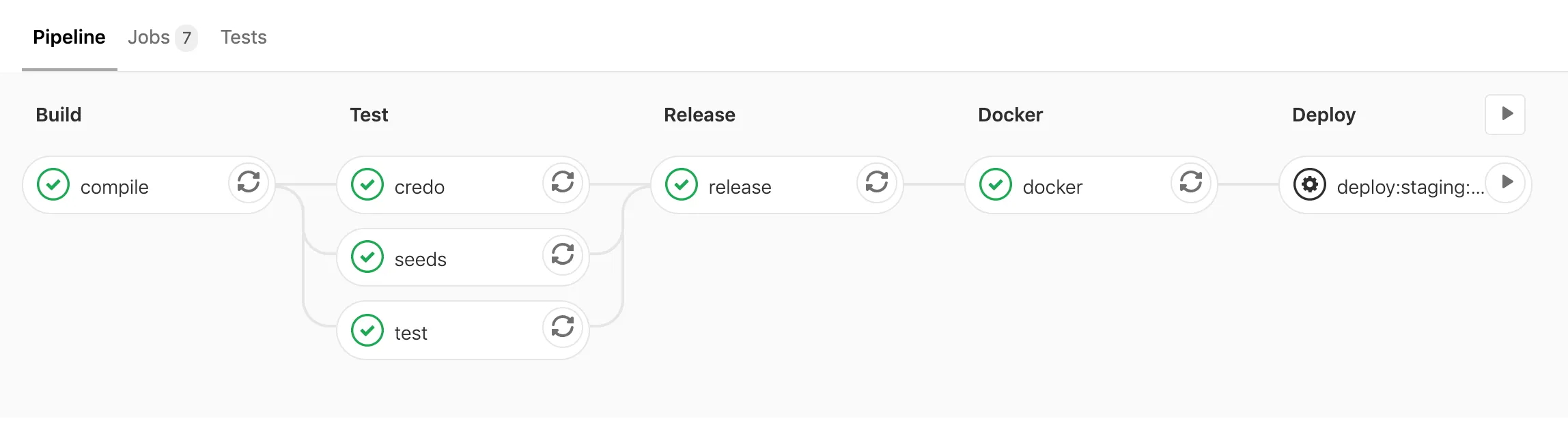
First, let’s take a look at the whole finished file and I’ll explain my reasoning step by step below.
image: elixir:1.10.2-alpinestages: - build - test - release - docker - deploy.setup: &setup - apk add --no-cache git openssl - mix local.hex --force - mix local.rebar --forcecompile: stage: build before_script: *setup variables: MIX_ENV: "test" script: - mix deps.get - mix do clean --only=test, format --check-formatted, compile --warnings-as-errors artifacts: paths: - _build - deps untracked: true cache: untracked: true key: files: - mix.lock paths: - deps - _buildtest: stage: test before_script: *setup services: - postgres:latest variables: POSTGRES_DB: test POSTGRES_HOST: postgres POSTGRES_USER: postgres POSTGRES_PASSWORD: "postgres" MIX_ENV: "test" script: - mix ecto.create - mix ecto.migrate - mix testcredo: stage: test before_script: *setup variables: MIX_ENV: "test" script: - mix credoseeds: stage: test before_script: *setup services: - postgres:latest variables: POSTGRES_DB: test POSTGRES_HOST: postgres POSTGRES_USER: postgres POSTGRES_PASSWORD: "postgres" MIX_ENV: "test" script: - mix ecto.resetrelease: stage: release before_script: *setup variables: MIX_ENV: "prod" script: - mix release artifacts: paths: - _build untracked: truedocker: stage: docker image: docker:19.03-git dependencies: - release services: - docker:19.03-dind script: - docker login -u $CI_REGISTRY_USER -p $CI_REGISTRY_PASSWORD $CI_REGISTRY - docker build -t "project_name:${CI_COMMIT_SHORT_SHA}" . - docker push "${CI_REGISTRY_IMAGE}:${CI_COMMIT_SHORT_SHA}".deploy: stage: deploy script: # Deployment specific stepsdeploy:staging: extends: .deploy environment: staging when: manual variables: ...deploy:production: extends: .deploy environment: production when: manual variables: ... only: - developStep by step
image: elixir:1.10.2-alpineI would recommend pinning a specific version of your dependencies. I prefer Alpine distributions due to their lightweight nature. It’s important to make sure the operating system matches the one where your application will run (for me, that’s later specified in the Dockerfile).
stages: - build - test - release - docker - deployWe override the default stages - it also serves nicely as a table of contents.
.setup: &setup - apk add --no-cache git openssl - mix local.hex --force - mix local.rebar --forceThis is GitLab’s syntax for what they call anchors. It allows us to specify a script that can be reused throughout the file.
Alpine images are great, but per the design they’re pretty minimalistic - hence the added package that was needed to get through some of my builds. Try to keep the list minimal and only add what you need. Likewise, we need to add Hex and Rebar to be able to install our Elixir dependencies.
This is the only common addition between the various steps of the build. Ideally, I would suggest expanding on the official Elixir Alpine image and pre-building it, to speed up your pipelines.
compile: stage: build before_script: *setupHere’s how we use the previously defined setup stage. You’ll see this repeated a few times.
variables: MIX_ENV: "test"script: - mix deps.get - mix do clean --only=test, format --check-formatted, compile --warnings-as-errorsHere’s where we fetch the depndencies and a check that the code has been formatted before compiling it. The main reason for the MIX_ENV setting there is so that the work here can be reused in the subsequent steps - where we run our tests. During the release step, we’ll build a binary for production environment using releases.
artifacts: paths: - _build - deps untracked: trueArtifacts allow you to keep files in between pipeline stages - read more about dependencies on GitLab. It’s important to specify that we’re interested in keeping the untracked files, as otherwise GitLab will follow your .gitignore file and you likely have all of those paths ignored. These will be used to speed up the next steps of the pipeline.
cache: untracked: true key: files: - mix.lock paths: - deps - _buildIn addition to artifacts, we specify a cache here for the same paths. Cache is kept between entire pipeline executions - it helps to speed it up again. The files key allows you to specify a file to be used as a key for the cache. Any time we update any of our packages, cache will be rebuilt. See more about cache:key:files on GitLab.
test: stage: test before_script: *setup services: - postgres:latest variables: POSTGRES_DB: test POSTGRES_HOST: postgres POSTGRES_USER: postgres POSTGRES_PASSWORD: "postgres" MIX_ENV: "test" script: - mix ecto.create - mix ecto.migrate - mix testThe only new thing here is that we can set up a PostgreSQL database through the use of services key. This will give us a database to work with for the purpose of the tests. See more about services on GitLab.
credo: stage: test before_script: *setup variables: MIX_ENV: "test" script: - mix credoCredo is a static code analysis tool. This will help you catch a number of issues and helps achieve more consistent code.
The only reason to use MIX_ENV=test here is to avoid having to do recompilation, as that’s how we’ve compiled earlier for the purpose of tests. I don’t believe this impacts much for Credo itself and the things it finds.
seeds: stage: test before_script: *setup services: - postgres:latest variables: POSTGRES_DB: test POSTGRES_HOST: postgres POSTGRES_USER: postgres POSTGRES_PASSWORD: "postgres" MIX_ENV: "test" script: - mix ecto.create - mix ecto.migrate - mix run priv/repo/seeds.exsOnce again we use the postgres service to have a database run through our seeds.
The credo, seeds and test jobs in the pipeline run in parallel thanks to the stage: test key.
release: stage: release before_script: *setup variables: MIX_ENV: "prod" script: - mix release artifacts: paths: - _build untracked: trueThis is where we make use of Elixir releases to get a binary out. At this point it’s important we use production environment. We keep the _build directory as an artifact for the next step.
docker: stage: docker image: docker:19.03-gitWe switch from using an Elixir Docker image to a Docker with git image. This is because we’ve now got everything we needed from Elixir, we have the final binary in place.
dependencies: - releaseIf we didn’t specify that we specifically depend on the release stage, all previous artifacts would be downloaded - this is a minor improvement.
services: - docker:19.03-dindscript: - docker login -u $CI_REGISTRY_USER -p $CI_REGISTRY_PASSWORD $CI_REGISTRY - docker build --build-arg APP_NAME=${APP_NAME} -t "$(APP_NAME):${CI_COMMIT_SHORT_SHA}" . - docker push "${CI_REGISTRY_IMAGE}:${CI_COMMIT_SHORT_SHA}"In general, your Docker / deployment steps will be quite custom to your project & company. I’d suggest keeping it simple - you can use the GitLab registry to store the images. APP_NAME is something you can specify in your pipeline environment variables, so that it’s easier to reuse the whole pipeline file between projects and make changes.
You can use the CI_COMMIT_SHORT_SHA variable to tag your images easily.
Deployment
I did not include much details in the deployment steps as it largely depends on how you operate. General advice that might be useful:
.deploy: stage: deploy script: # Deployment specific stepsI would suggest trying to keep staging & production deployment steps as similar as you can - having a reusable anchor helps
environment: stagingSpecifying environment key here allows your pipeline to pull environment specific values from your repo’s configuration - see more about variables on GitLab.
when: manualThanks to this you can use GitLab Pipeline UI as your deployment tool.
only: - developFinally, consider only allowing production deployments from your develop or master branch.
Dockerfile
Given you have a binary made in the release step, your Dockerfile can be as simple as the following:
FROM alpine:3.11ARG APP_NAMEENV REPLACE_OS_VARS=trueENV APP_NAME=${APP_NAME}ENV MIX_ENV=prodENV INSTALL_PATH=/appRUN mkdir -p ${INSTALL_PATH}WORKDIR ${INSTALL_PATH}COPY _build/${MIX_ENV}/rel/${APP_NAME}/ "${INSTALL_PATH}/"ENTRYPOINT ["/bin/sh", "-c", "${APP_NAME} start"]